Stock Portfolio Tracker Across Multiple Brokers
If your stocks are spread across more than one broker, no single brokerage app will ever show you the full picture. Trackfolio Pro brings all your positions together in one dashboard — without connecting accounts, sharing credentials or installing any integrations.

All Brokers in One View
Add stock positions from any broker — IBKR, Fidelity, Schwab, Robinhood, any international broker — and see your entire portfolio consolidated in a single dashboard without linking any account.
Accurate Cost Basis Per Position
Enter multiple purchases of the same stock and Trackfolio Pro calculates your weighted average entry price automatically. See your real gain or loss per position, not just the current price.
US Stocks, CEDEARs and ETFs
Track individual stocks alongside ETFs and index ETFs in the same portfolio, from VOO and SPY to any position listed on the NYSE or Nasdaq, plus Argentine CEDEARs and BYMA-listed shares. Full allocation breakdown and performance data for every position you hold.
The problem with tracking stocks through your broker
Your brokerage app is built to show you the positions you hold with that specific broker. The moment you open a second account — a different broker for international stocks, a separate IRA, a platform with lower fees for ETFs — you lose the unified view. You end up logging into two or three different apps, manually adding up values and guessing at your real allocation.
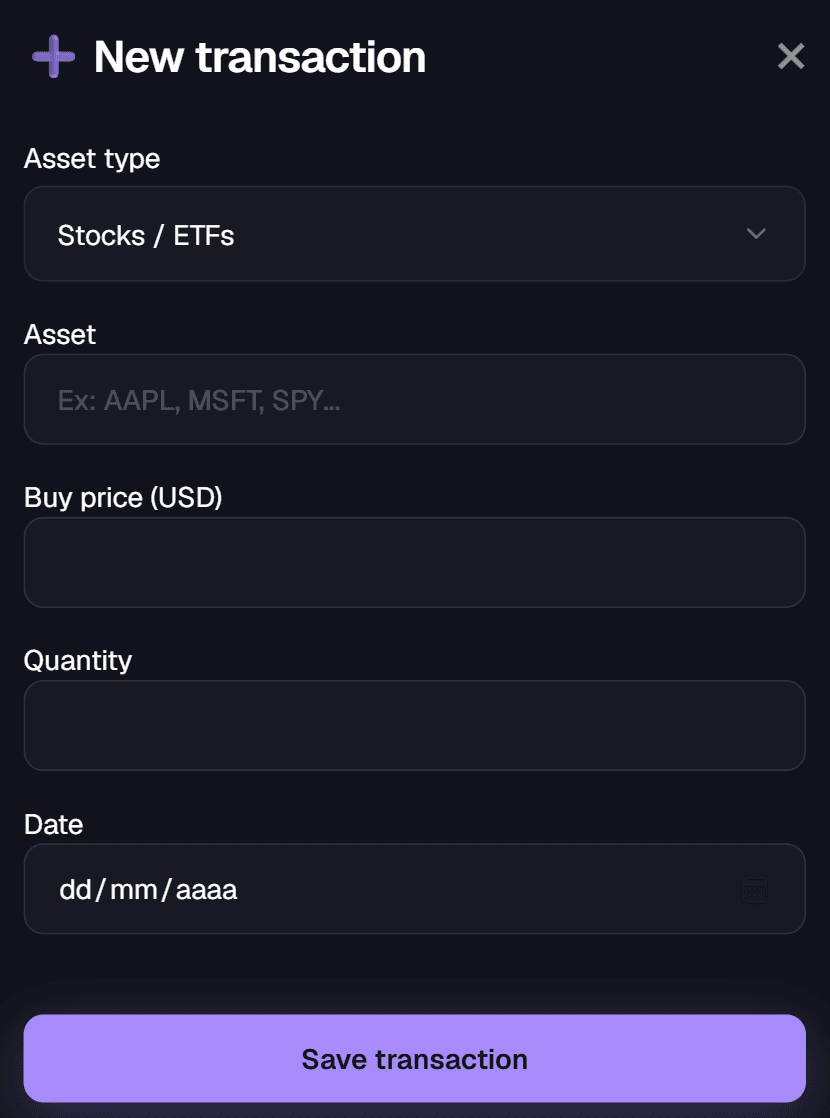
Trackfolio Pro solves this with manual entry that takes seconds. Add each position with ticker, quantity, purchase price and purchase date. The platform builds a unified view of your entire stock portfolio — total value, per-position performance, asset allocation and historical growth — without requiring read access to any of your accounts.
What if my broker isn't supported by portfolio trackers?
Most portfolio trackers sync by connecting to your brokerage account through an aggregator such as Plaid, SnapTrade or Yodlee. Each one covers a specific list of institutions, and those lists are shorter and more different from each other than you would expect. Plaid's investments product reaches brokerages in the US and Canada. SnapTrade publishes around forty brokerage integrations worldwide. Your tracker picked one of them, and if your broker is not on that particular list — Trade Republic, Scalable Capital, XTB, Revolut, or almost any broker in Latin America — the tracker does not reject you. It simply has no way to import your positions, and you are left copying numbers into a spreadsheet.
Trackfolio Pro takes the opposite approach. There is no connection to set up, no institution list to check against and no credentials to hand over. You enter each transaction yourself: ticker, quantity, price and date. What determines whether your portfolio can be tracked is not where you bought the asset — it is what the asset is.
If you hold US-listed stocks and ETFs — anything trading on the NYSE or Nasdaq — Argentine CEDEARs and BYMA-listed shares, or crypto, Trackfolio Pro prices your positions automatically, no matter which broker or exchange you bought them through. A share of VOO bought through a European broker is priced exactly like one bought through Schwab, because the price comes from the market, not from your account.
Portfolio totals can be displayed in USD, EUR or ARS, so you can read your positions in the currency you actually think in, even when the assets themselves trade in dollars. Start tracking all your stock positions today.
Which brokers do portfolio trackers actually support?
Automatic syncing depends entirely on which aggregator your tracker integrated, and each aggregator covers a different set of brokers. The table below shows where some of the most widely used brokers stand. A broker supported by one aggregator is still invisible to a tracker built on another.
| Broker | Home market | Plaid Investments | SnapTrade | Trackfolio Pro |
|---|---|---|---|---|
| Charles Schwab | United States | Yes | Yes | Yes |
| Interactive Brokers | United States / global | Yes | Yes | Yes |
| DEGIRO | Europe | No | Yes | Yes |
| Trading 212 | Europe | No | Yes | Yes |
| eToro | Global | No | Yes | Yes |
| Trade Republic | Germany | No | No | Yes |
| Scalable Capital | Germany | No | No | Yes |
| XTB | Poland | No | No | Yes |
| Revolut | United Kingdom / EU | No | No | Yes |
Aggregator coverage verified September 2026 against each provider's published documentation. These lists change — check your tracker's supported institutions before assuming your broker is included. Yodlee is not shown as a column because it does not publish a searchable institution list.
The last column is not a coverage claim, because Trackfolio Pro has no coverage list to maintain. Manual entry means the broker never enters the equation. What matters is the asset: if your position is a US-listed stock, an ETF or a crypto asset, it can be tracked here regardless of the platform you used to buy it. That also holds for brokers in markets no aggregator serves at all, including most of Latin America.
Read Your Portfolio in USD, EUR or ARS
Your positions trade in dollars, but your rent does not. Switch the whole dashboard between US dollars, euros and Argentine pesos to see what your portfolio is worth in the currency you actually spend.
Track Stocks and Crypto Together
Add your crypto holdings to the same dashboard as your stock positions. See total portfolio allocation, blended returns and how each asset class is contributing to your overall performance.
Seeing how your stock portfolio is actually allocated
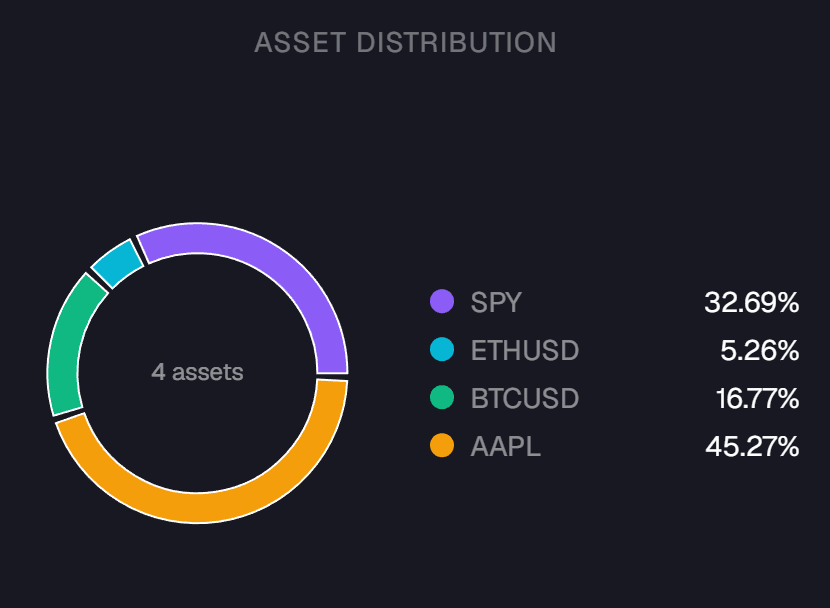
Knowing your total portfolio value is useful. Knowing how that value is distributed across positions is what tells you whether you are taking the risk you think you are. Allocation is where a spread-out portfolio hides its real problems: a single stock quietly growing into a third of your holdings, two ETFs that turn out to track almost the same index, or a crypto position that doubled and now dominates a portfolio you consider conservative.
This is exactly what a per-broker view cannot show you. Each brokerage app calculates percentages against the balance held with that broker, so a position that represents ten percent of one account might represent thirty percent of everything you own. The number is correct and the conclusion you draw from it is wrong.
Trackfolio Pro calculates allocation across your entire portfolio as you add transactions. Every position is shown as a percentage of the total, and the breakdown updates with each new entry. Stocks, ETFs, index funds and crypto are measured against the same total, so you can see how much of your money sits in each asset class rather than guessing at it. If you keep separate portfolios for different strategies, each one gets its own independent allocation view.
Whether you follow a target allocation strictly or simply want to notice when one position has grown out of proportion, seeing the real distribution is what lets you rebalance on evidence instead of on a hunch. If a meaningful share of that distribution is digital assets, the crypto portfolio tracker covers how those positions are priced and averaged.
How to track stocks across multiple brokers
Create a portfolio
Name it after a broker, a strategy or a goal — "US Stocks", "Dividend Portfolio", "Index Funds". You can create as many as you need.
Add your positions
Enter each stock with ticker, quantity and purchase price. Multiple buys of the same position are averaged automatically into a single weighted cost basis.
See the full picture
Your dashboard shows total portfolio value, gain or loss per position, allocation by asset, and historical performance — all in one view, whatever broker you bought through.
FAQ
Can I track stocks from different brokers in the same dashboard?
Yes. Manual entry means the broker is never the limiting factor. Add US-listed stocks and ETFs bought through IBKR, Fidelity, Schwab, Robinhood or any other platform, and see every position in one consolidated view.
Do I need to connect my brokerage account?
No. Trackfolio Pro does not connect to brokers, use Plaid or Yodlee, or request any account credentials. You enter transactions manually and your financial data stays entirely private.
How does cost basis work when I buy the same stock multiple times?
Each time you add a buy transaction for the same ticker, Trackfolio Pro recalculates your weighted average entry price automatically. You always see your true cost basis, not just the price of your most recent purchase.
Can I track ETFs and index funds as well as individual stocks?
Yes. Individual stocks, ETFs and index ETFs all work in the same portfolio with the same performance analytics, as long as they trade on the NYSE, Nasdaq or BYMA. European listings are not priced yet.
Can I see how my portfolio value has changed over time?
Yes. Trackfolio Pro records your portfolio value daily and charts its evolution, so you see how your holdings have grown or fallen across months, not just today's snapshot.
Does the stock tracker work on mobile?
Yes. Trackfolio Pro is fully responsive and works on desktop, tablet and mobile so you can check your portfolio from anywhere.
One dashboard for all your stock positions
Track stocks across every broker you use — without connecting accounts, sharing credentials or losing your privacy.